Page 1 of 1
Console Screen Shot issues
Posted: Tue Sep 08, 2020 1:32 pm
by Danham
Air Spy Win 7 Windows photo viewer Shows blank console and external radio data only ?? DanHam
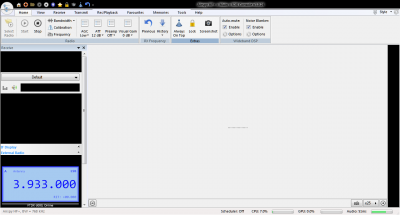
- My Screen Shot
- My Screen Shot
Console Screen Shot issue
Posted: Tue Sep 08, 2020 1:55 pm
by Danham
Only fills in External Radio? Dan
Re: Console Screen Shot issue
Posted: Tue Sep 08, 2020 2:18 pm
by Simon G4ELI
I'll dig out a Windows 7 system. I'm sure this hasn't changed.
Re: Console Screen Shot issue
Posted: Tue Sep 08, 2020 2:51 pm
by Danham
OK Simon, By the opened with Windows photo viewer and tried Photo Gallery,Paint and movie maker with no joy> Dan
Re: Console Screen Shot issue
Posted: Tue Sep 08, 2020 3:20 pm
by Simon G4ELI
Simon G4ELI wrote: Tue Sep 08, 2020 2:18 pm
I'll dig out a Windows 7 system. I'm sure this hasn't changed.
No, works fine on my Windows 7 systems.
Re: Console Screen Shot issue
Posted: Tue Sep 08, 2020 3:41 pm
by Danham
Why would External Radio show and not the rest?? Baffling? Maybe some one will see this and and have answer. 73 Dan W9JFM
Re: Console Screen Shot issue
Posted: Tue Sep 08, 2020 5:48 pm
by m3ghe
Danham wrote: Tue Sep 08, 2020 1:55 pm
Only fills in External Radio? Dan
What happens if you use Win 7s Snipping Tool to take the screen shot?
If you aren't familiar with Snipping Tool this video shows you about it.
Re: Console Screen Shot issue
Posted: Tue Sep 08, 2020 9:22 pm
by Danham
Thanks Martin. Snipping tool works:) Still would be nice if Console button worked? 73 Dan
Re: Console Screen Shot issue
Posted: Wed Sep 09, 2020 7:02 am
by m3ghe
Danham wrote: Tue Sep 08, 2020 9:22 pm
Thanks Martin. Snipping tool works:) Still would be nice if Console button worked? 73 Dan
I suggested it more as a way to confirm it was SDR-C having the problem, rather than a permanent solution.