Page 1 of 1
Interferences Airspy HF+ Discovery
Posted: Mon Nov 18, 2024 2:33 pm
by HB9VQQ
I am comparing RX path performance using WSPR according to this setup
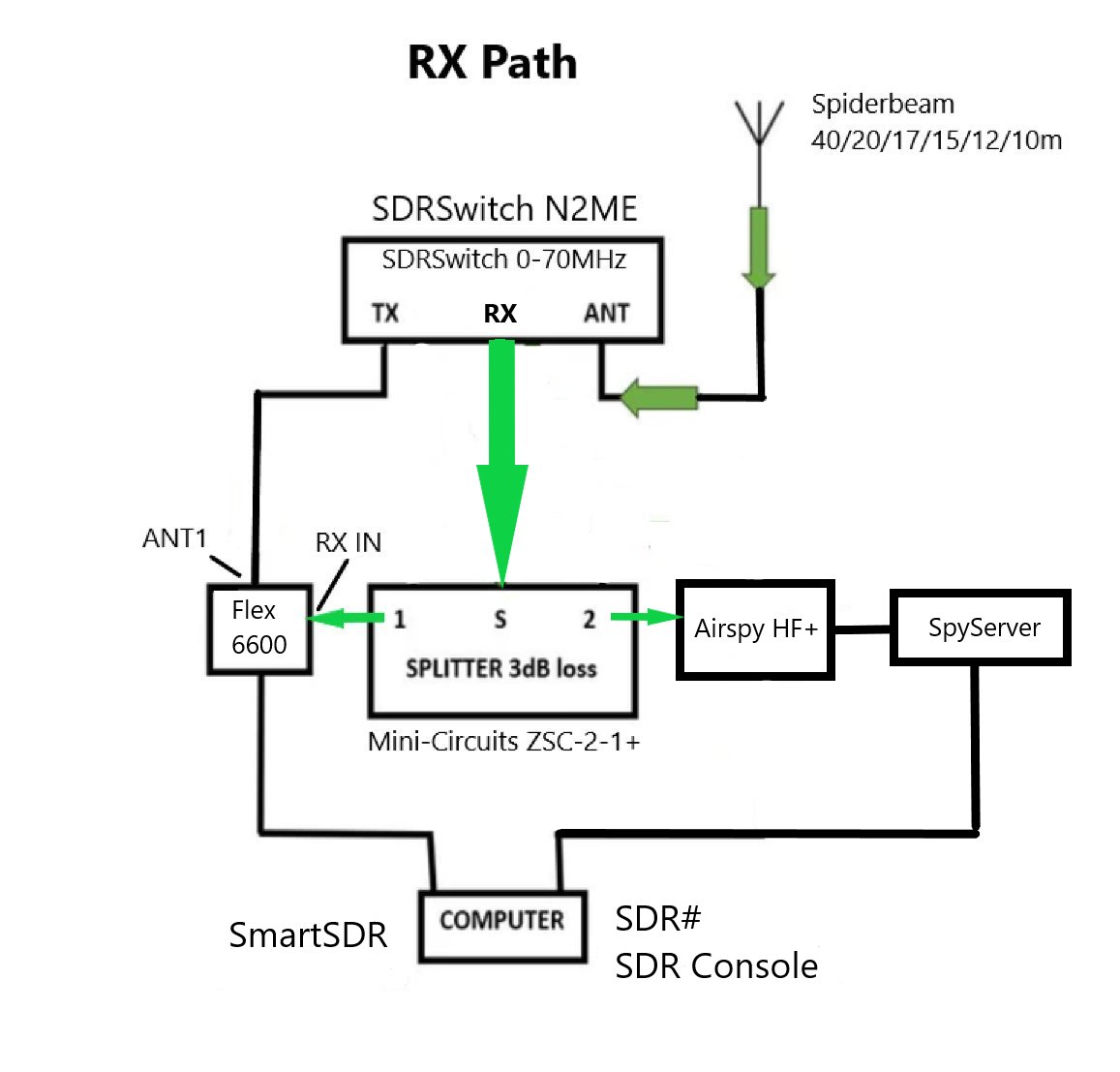
- GcqKWC4WwAAiYNX.jpeg (70.11 KiB) Viewed 38575 times
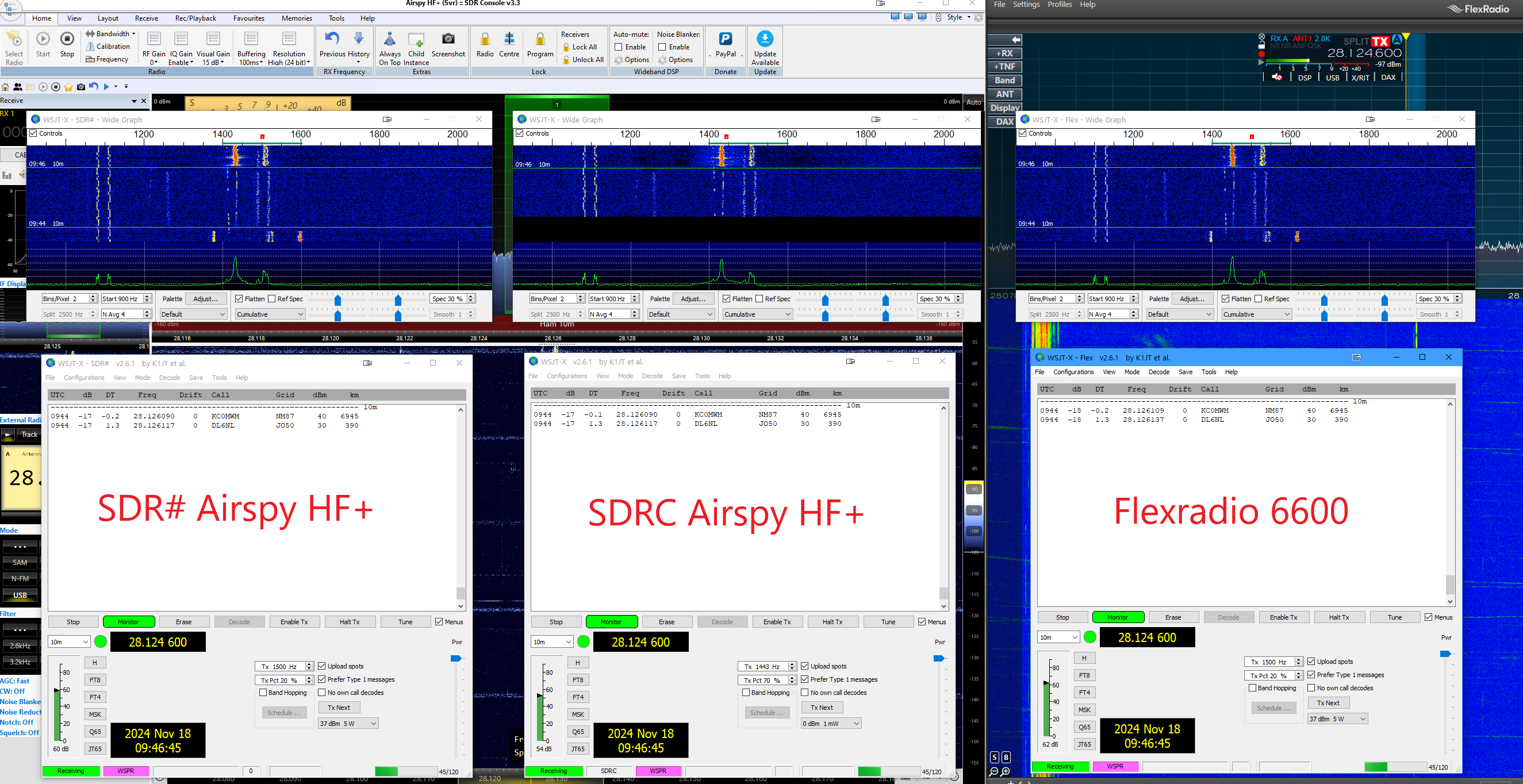
- WSPR-compare.png (1.42 MiB) Viewed 38575 times
In SDRC I can see interferences (horizontal lines) it looks like splatter from a nearby station. I do not see any of these in SDR# or SmartSDR. Therefore I think it might be a misconfiguration on my side in SDRC?
Here is the video
73
Re: Interferences Airspy HF+ Discovery
Posted: Mon Nov 18, 2024 10:26 pm
by HB9VQQ
Just to add, there is plenty of processing power and RAM available. SpyServer runs on a Ryzen 5 5560U with 16GB of memory, and SDRC v3.3 runs on an i9 with 64 GB of RAM, Win10. The network is 1 Gb/s end to end. I am monitoring the system's KPIs, and I don't see any bottlenecks in network or system resources.
Re: Interferences Airspy HF+ Discovery
Posted: Tue Nov 19, 2024 11:05 am
by jdow
I would guess that it is down to the way SDRC calculates the pixels to display. Simon accentuates weak narrow band signals that appear in the FFT bins that together make up the pixel for display. It may be a "feature". It is supposed to make detecting weak signal presence easier.
{^_^}
Re: Interferences Airspy HF+ Discovery
Posted: Tue Nov 19, 2024 11:35 am
by HB9VQQ
It seems to impact decode performance quite a bit
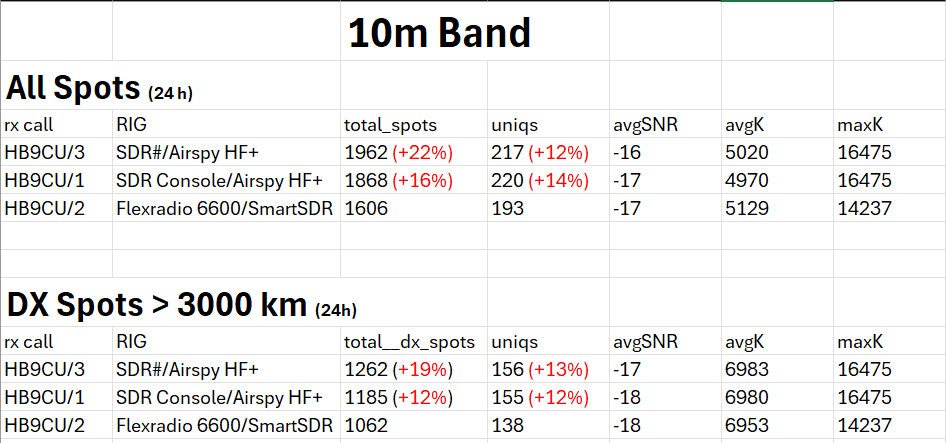
- Unbenannt.png (39.95 KiB) Viewed 38497 times
Re: Interferences Airspy HF+ Discovery
Posted: Tue Nov 19, 2024 8:19 pm
by Max
In your video, if you see the way that not only the noise floor is jumping up and down but so simultaneously are all the signal levels. Looks awfully like AGC pumping due to strong signal somewhere within the front-end bandwidth of the HF+.
Be nice to see the same test but without SpyServer, so the HF+ plugged directly into the PC. However, the mystery is that (presumably via SpyServer) you say SDR# does not do it. I'm not familiar with SpyServer. Why no AGC controls on the Home tab? Are the RF (SDR) AGC settings (wherever they are) identical for all setups?
There appears to be no audio on the video recording. Not essential I guess, but might be nice to also be able to hear the effect.
Max
Re: Interferences Airspy HF+ Discovery
Posted: Tue Nov 19, 2024 10:11 pm
by HB9VQQ
I repeated the comparison today and could no longer reproduce the problem. As expected, today's numbers are very close to each other. I will wait for the next opening of the 10m band tomorrow and see if the issue occurs again. The AGC settings are the same and the DSP functions are all turned off. Both SDR# and SDRC are connected to the SpyServer. SDR# has no such pumping behavior.
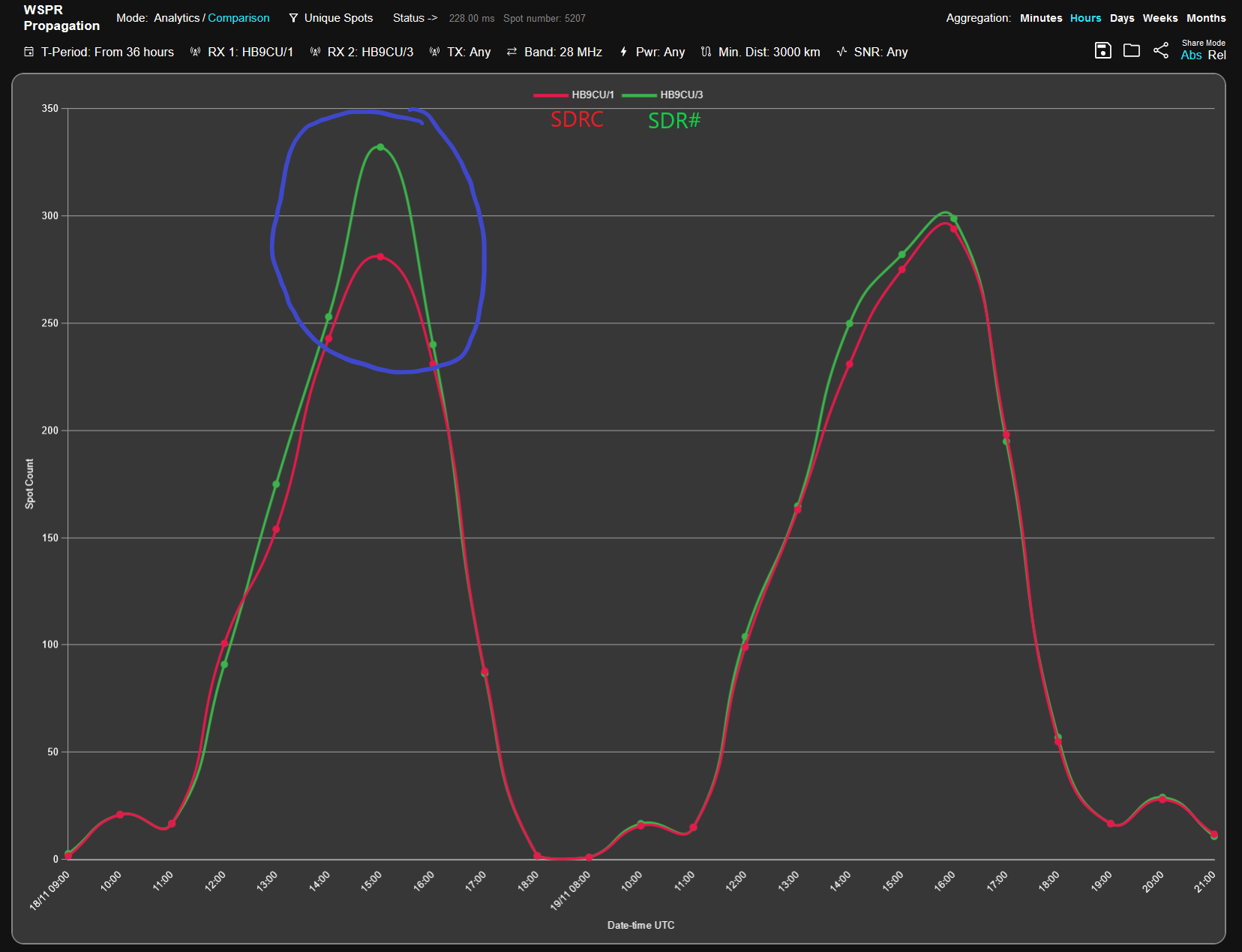
- SDRCvsSDRsharp.png (166.68 KiB) Viewed 38439 times
Re: Interferences Airspy HF+ Discovery
Posted: Wed Nov 20, 2024 2:36 am
by jdow
OK, now I have more to chew on. Do you have AirSpy's AGC turned on one place and off another? The pumping action really does sound like a station inside the RF bandwidth of the AirSpy but not showing in your posted views. The AirSpy AGC systems could lead to the pumping action, most probably if the AGC is off. Also, it comes to mind that it might be best to tune AirSpy about 1% of the screen bandwidth or more away from the exact front end tuned frequency. But it is probably the front end getting overloaded doing this to you. So it might pay to try setting the front end frequency so that it is perhaps 75% of the way from center both high side and low side to get the strong signal out of the RF passband.
{^_^}
Re: Interferences Airspy HF+ Discovery
Posted: Wed Nov 20, 2024 7:35 am
by HB9VQQ
AGC is set to fast and not turned off in other places. AGC is set to fast on SDR# and SDRC. All settings are the same for both SDR# and SDRC. I don't observe the pumping on SDR# so I will stick with SDR#.
Re: Interferences Airspy HF+ Discovery
Posted: Wed Nov 20, 2024 9:35 am
by HB9VQQ
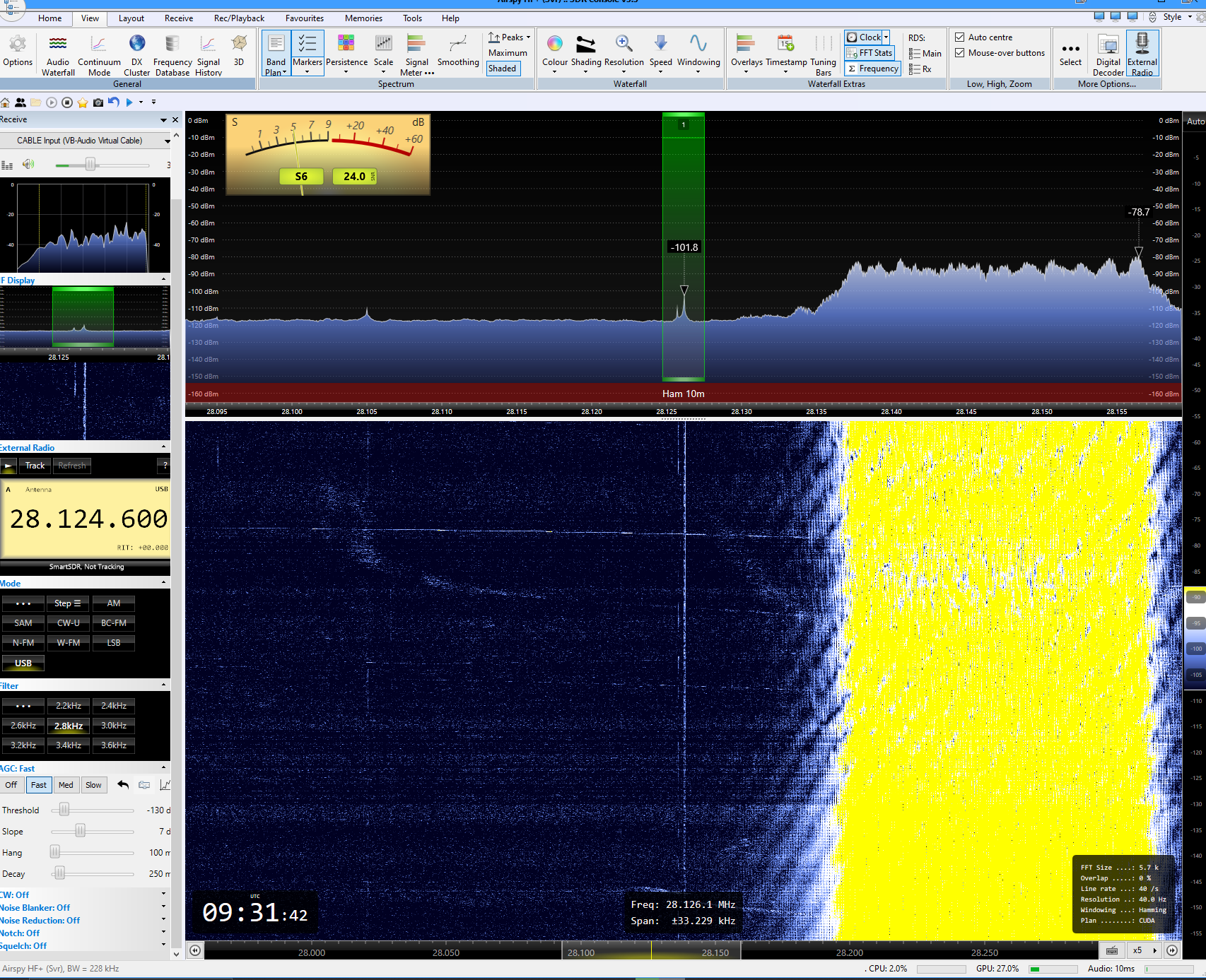
I just saw by chance a strong OTHR signal right next to the WSPR QRG on 10m not leading to a pumping effect
- OTHR-SDRC.PNG (752.32 KiB) Viewed 38372 times
Re: Interferences Airspy HF+ Discovery
Posted: Wed Nov 20, 2024 11:01 am
by HB9VQQ
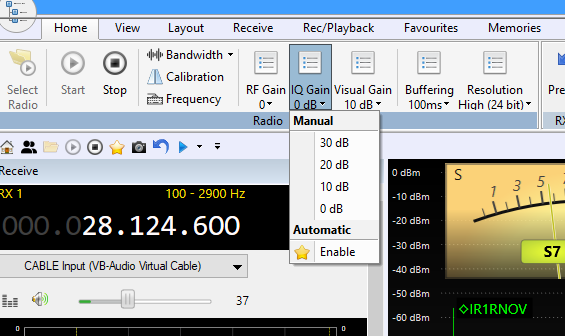
Setting IQ Gain from “Enable” to another manual value solves the problem. No pumping anymore
- IQ Gain.PNG (46.04 KiB) Viewed 38364 times