Page 1 of 1
Losing / restoring controls
Posted: Fri Dec 26, 2025 4:48 pm
by iantresman
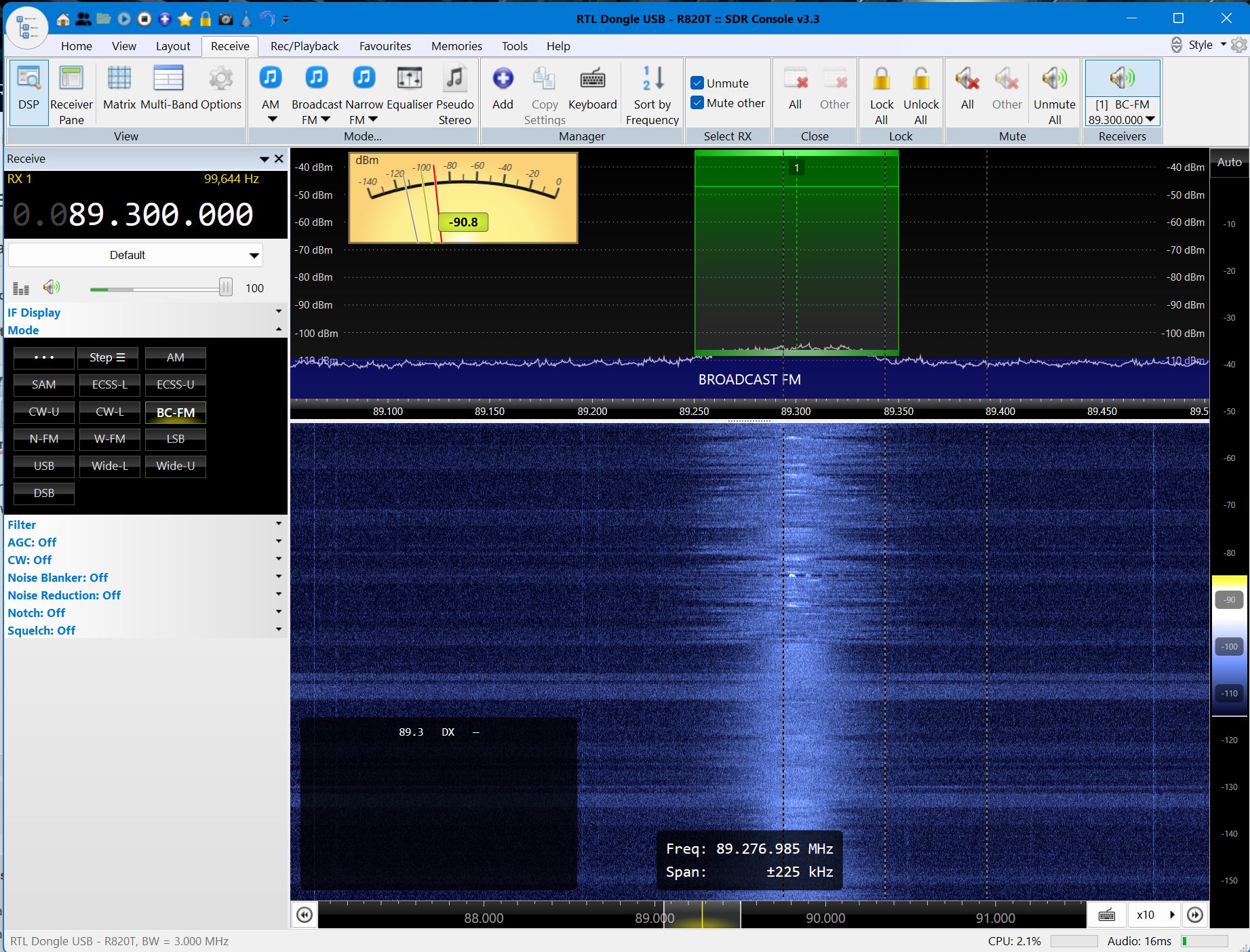
My horizonal Receiver Pane shows (a) a dBm meter, and (b) a green overlay (not sure what it is called) which appears to select the audio bandwidth with the number [1] in the middle.
1. Sometimes I lose both the dBm meter and green overlay. How do I restore each?
2. My waterfall pane shows a black cut-out titled with the currently selected frequency and the letters "DX". I'm not sure what this cut-out is called, what it is for, and how I remove it?
- SDR Clipboard_12-26-2025_01.jpg (505.93 KiB) Viewed 2669 times
Re: Losing / restoring controls
Posted: Fri Dec 26, 2025 11:28 pm
by Max
iantresman wrote: Fri Dec 26, 2025 4:48 pm
My horizonal Receiver Pane shows (a) a dBm meter, and (b) a green overlay (not sure what it is called) which appears to select the audio bandwidth with the number [1] in the middle.
1. Sometimes I lose both the dBm meter and green overlay. How do I restore each?
2. My waterfall pane shows a black cut-out titled with the currently selected frequency and the letters "DX". I'm not sure what this cut-out is called, what it is for, and how I remove it?
SDR Clipboard_12-26-2025_01.jpg
1. See here:
https://www.sdr-radio.com/s-meter
2: See here (to some extent):
https://www.sdr-radio.com/receivers
The green bar with the 1 on it indicates the tuned frequency of Receiver #1. Look at the Receive tab (as you have shown) and along the top right hand side it shows how man receivers you have active and what frequency they are tuned to.
If you go to Simon's website (that I have linked above) move/hover your mouse cursor along the top menu bar to reveal drop-down menus that cover many of the SDRC functions. Sadly it;s a bit incomplete so does not cover everything but it does cover most things needed. Anything else come back here and feel free to ask.
Max
Re: Losing / restoring controls
Posted: Sat Dec 27, 2025 12:26 am
by Max
Forgot about the black "cutout" that you mentioned with "DX" in it.
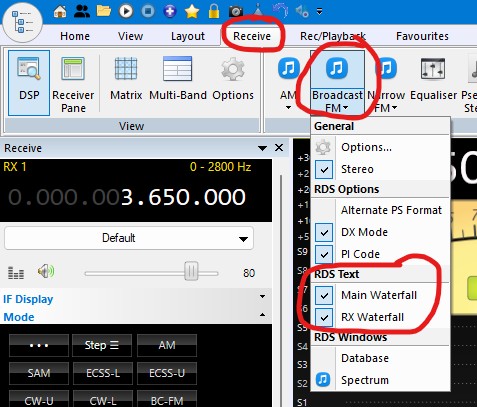
That is showing RDS information for broadcast VHF-FM stations.
Set the Mode button to "BC-FM" and the filter width to about 150kHz then try tuning stations in the range 88 to 108 MHz. When you tune in a station you will see this box come to life with the RDS information transmitted by the station.
To turn it off see the attached picture (RDS Text > Main Waterfall)
Max
- RDS.jpg (68.95 KiB) Viewed 2661 times
Re: Losing / restoring controls
Posted: Sat Dec 27, 2025 12:30 am
by Max
Sorry, in my first answer I see I mixed up your questions (b) and (2). Your question (2) is actually answered in my last post about RDS. My bad.
Max
Re: Losing / restoring controls
Posted: Sat Dec 27, 2025 7:04 am
by jdow
Regardless - when posting a picture of SDRC running, do NOT close all the panes on the left. Show as much as you can. For one thing it looks like you've set the "Filters" bandwidth (IF bandwidth in traditional think) selection low (100 kHz) for broadcast FM in the US. You want to open it up to about 150 kHz or even 250 kHz for some uses.
You also have your front end's gains set way low - or else you don't have an antenna on it. Increase gain until both the noise level beside the signal and the signal itself both raise the same amount. Back off one gain step. That's a good setting for noise figure and overload considerations. For an RTLSDR dongle you theoretically get best performance with the 2.4 Msps sample rate. You don't need (or want) decimation. That is done anyway in achieving the configured IF filter bandwidth (input to the demodulator). AF bandwidth cannot be set specifically. The FM signal format defines that.
Once you have seen how it all works and you have the money for it, get a better front end for better general performance. (At this frequency range I am partial to AirSpy devices.)
{^_^} Joanne