Page 1 of 1
W8GTX testing
Posted: Sun May 03, 2026 4:52 am
by W8GTX - BDM
Hi folks. I set the server on a new PC. Can you please test it and let me know if there are any issues? Thanks.
Re: W8GTX testing
Posted: Sun May 03, 2026 8:43 am
by Max
W8GTX - BDM wrote: Sun May 03, 2026 4:52 am
Hi folks. I set the server on a new PC. Can you please test it and let me know if there are any issues? Thanks.
If you mean W8GTX should be showing in the SDRC V3 Server list, no, I don't see it.
Max
Re: W8GTX testing
Posted: Sun May 03, 2026 12:04 pm
by KA1GJU
You appear on list of servers only if you search for your call, or by checking valid status. So you are reachable, but since there's no guest username/password to exchange with a potential client, no SDR's appear in the list.
Step 1: You need to make a guest account under the Accounts tab of the Server Manager. IE Place Guest or Public for the name and a simple password (this gets exchanged automatically when a client builds a definition), so keep it simple for the next step #2. While you are here, place realistic values for Maximum Connection Time and Interval Between. This is where you can make a feeble attempt to keep the SDR Hogs at bay. If you have a good location (QRM Free) and a good antenna, they will latch onto your server for 16-18 hours per day!
Typically on FT8 or on Children's Band (CB), and nobody else will be able to use it... ask me how I know!
Step 2: Then you need to place the EXACT username and password into the Default Server Account under the On Air tab. While you are here, you may enter your dynamic DNS data into the blank IP address, if you use a service to resolve your public IP. Mine changes monthly and whenever the router gets rebooted, so I use the no-ip DNS service. OTW one has to rebuild definitions every time your IP changes. Also uncheck Show Uploads if checked.
Step 3: Hit Save at the top of the On Air tab. You should see a green checkmark at bottom of screen saying ON Air Status [time stamp] OK
Re: W8GTX testing
Posted: Sun May 03, 2026 5:47 pm
by W8GTX - BDM
Thank you, Kriss. You helped me in the past. I sent you an email.
-Brian
Re: W8GTX testing
Posted: Sun May 03, 2026 9:05 pm
by W8GTX - BDM
Should be fixed now. Thank you, Kriss
Re: W8GTX testing
Posted: Sun May 03, 2026 10:29 pm
by Max
W8GTX - BDM wrote: Sun May 03, 2026 9:05 pm
Should be fixed now. Thank you, Kriss
Sorry to say, as of 22:27 UTC I am not seeing anything (unless you are not listed as W8GTX?).
Max
Re: W8GTX testing
Posted: Mon May 04, 2026 10:14 am
by KA1GJU
Max,
It's showing now. It was missing the default username/password for the guest account in the On Air tab of the manager. As of ~ midnight Zulu, it was operational. We were PMing to get things right yesterday.
Re: W8GTX testing
Posted: Mon May 04, 2026 1:00 pm
by Max
KA1GJU wrote: Mon May 04, 2026 10:14 am
Max,
It's showing now. It was missing the default username/password for the guest account in the On Air tab of the manager. As of ~ midnight Zulu, it was operational. We were PMing to get things right yesterday.
Yep, seeing that now. Pity about the heavy RFI on the lower HF bands particularly. But yes, it's working fine. Well done folks.
Must admit I did not even know there was an RSPdx-R2! Out of interest, what level of Visual Gain setting gives S0 noise with no antenna connected on the 80m band?
Always fascinated to see the AM stations still going on the broadcast AM band in the USA. Here in the UK there are few state broadcaster (BBC) stations, I guess mandated by the UK Gov, but local activity all but ceased, often due to the cost of power to run the transmitters versus the tiny number of listeners!
Max
Re: W8GTX testing
Posted: Mon May 04, 2026 7:20 pm
by KA1GJU
I was discussing that with him last night. The default gains are a bit too much.
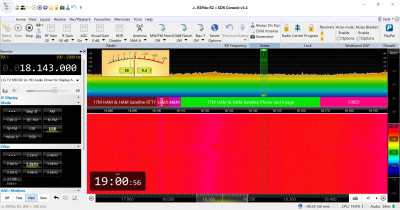
- Upon first connection!
Needs to put some data in the server manager to give us a hint of what's the realistic settings should be.
That way it shows up in the Server Options tab, under Station Description.
The other pic is a 5KW AM station in Salem, NH as heard in Freedom, NH ~70 miles away.
We have AM stations every 10KHz at night, almost the same during the day.
- Upon first connection!
Re: W8GTX testing
Posted: Mon May 04, 2026 9:52 pm
by W8GTX - BDM
Part of the noise issue from around 13/MHz to 20+ is the AC unit. There are other noise sources, but that is the worst offender. When I get a chance, I'll get around to hunting some of the other sources down. I suspect part of it is my neighbor with all her oddball lights and draping her garage in light, etc., etc. Also, working an average of 12 hours days isn't leaving me much time. I'll do my best. I appreciate the support. Antenna C is the outside loop and suffers the least amount of noise.