Thanks Max. Interesting link. I have taken that advice and I seem to have split operations working fairly well.
Here are the steps I have developed to get Split working with my IC-7600 and OmniRig.
Hardware config:
1. Have SDRPlay device connected to Rx Ant Out jack on the IC-7600. Have SDRPlay device connected to computer with USB cable.
2. I have a DX Engineering Receiver Guard connected between the Rx Ant Out jack and the input to the SDRPlay device.
3. Make sure CAT control is working between logging software and IC7600.
4. Long Press Ant1 button on IC-7600 to send antenna input on 7600 to the SDRPlay device.
Software Config:
1. Open SDR Console, press Start button if necessary, then in External Radio window, click on Track. If external radio window pane is not visible, click on View, External Radio button. May require a restart.
2. Click on strong signal, the 7600 should tune to that frequency (CAT working). If not, click on the ? symbol in the External Radio pane to bring up options Make sure Ommi-Rig is online.
3. To adjust bandwidth of the spectrum display - mouse over the upper right of scan window and a menu appears, Zoom, then adjust slider. for working DX I run about 20 kHz, this gives you enough detail to see gaps in calling stations, and see who is responding the the DX stations call.
4. Once on the DX freq with Radio 1, and tracking with radio, click the track button on the External Radio pane to not track.
5. Put 7600 into Split mode, and move to a split tx freq. This will be where you will be transmitting.
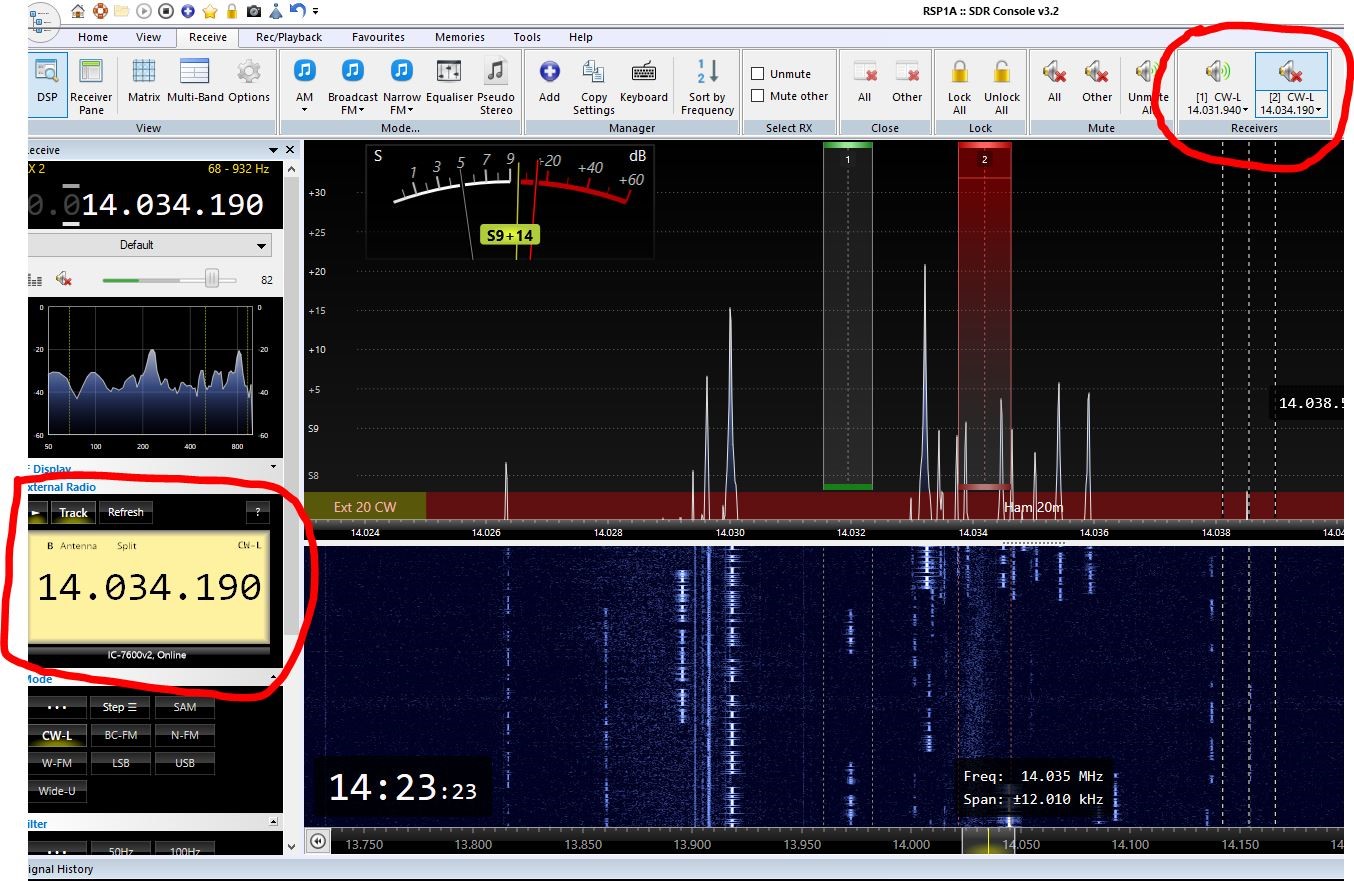
6. Open new radio (2) by clicking on Receive tool bar, then the + or Add button. You should now have two receivers on the tool bar. Click on the (2) receiver to mute it. Then in the External Radio pane click on track.
Now Radio 2 should tack with the Split freq on the 7600. This is a two way sync. You can click on the SDR Console spectrum display to move your tx frequency on the 7600 - where you will be calling the DX. Or you can turn the freq dial on the 7600 and the radio 2 frequency on SDR Console will change.
Things to remember.
First click on the Receiver in the ribbon, then to External Radio and Track to turn on tracking or turn off tracking. This can be a bit confusing if you don't make sure you are on the correct receiver.
Disclaimer - I am really new to SDR Console, and there is likely to be better ways of working split. This is what I have found to work, and can be replicated easily. If you know of better ways, shortcuts, etc, please post them.
Here is a screen shot of me working split on SDRConsole. You might have to scroll to the right to see all of the image.
- SDR Console Split 2.JPG (294.07 KiB) Viewed 8971 times