
Hi
I am completely new to this forum, also to SDR Console.
I downloaded V3.3 and completed the installation. My HL2 was immediately recognised but on starting Console, no signals were received. Instead RF was immediately output on an unknown frequency. The SWR to my TH11 antenna is indicated at 5.5:1 suggesting transmission was well outside of the amateur bands. I have been unable to find any way to cease transmission and enable the RX, aside of course from hitting stop which at least terminates RF output. Perhaps I am failing to do something obvious.
Hints appreciated.
73 Bob, 5B4AGN
SDR Console 3.3 on HL2
Re: SDR Console 3.3 on HL2
Hi BobBob wrote: Mon Sep 16, 2024 3:25 pm I downloaded V3.3 and completed the installation. My HL2 was immediately recognised but on starting Console, no signals were received. Instead RF was immediately output on an unknown frequency. The SWR to my TH11 antenna is indicated at 5.5:1 suggesting transmission was well outside of the amateur bands. I have been unable to find any way to cease transmission and enable the RX, aside of course from hitting stop which at least terminates RF output. Perhaps I am failing to do something obvious.
Hints appreciated.
73 Bob, 5B4AGN
That's a new one on me. Have you tested the HL2 with other software to make sure it is SDRC that is causing the issue and not a hardware issue? As the simplest "download and go" option I suggest you also try SparkSDR:
https://www.sparksdr.com/
However, please also send (attached to the message here, NOT inserted as a picture) a FULL screenshot of SDRC in the "fault" condition. By "full" I mean do NOT crop or resize the image as generated by the screenshot tool. There is valuable diagnostic information on all edges/corners of the screen. Please also make sure when you do this that the "Home" tab is selected in the Ribbon Bar. Please see here:
https://www.sdr-radio.com/screenshot
Also, did you verify that the HL2 is actually outputting RF? Or are you just relying on the meters in the radio panel (TX DSP) of SDRC? Hang a power meter on the output and please verify that RF is actually being output from the HL2, and at approximately what level?
73
Max
Re: SDR Console 3.3 on HL2
Bob, further to my last email, do you have any jack plug inserted into the front panel 3.5mm PTT jack on the HL2? If you do, unplug it then repeat tests. it does sound like possible short on that socket somehow that's is keying the hardware, so sounds like shorted plug or cabling to it?Bob wrote: Mon Sep 16, 2024 3:25 pm My HL2 was immediately recognised but on starting Console, no signals were received. Instead RF was immediately output on an unknown frequency.
However, if this is not the case, please report back as per my previous post.
73
Max
Re: SDR Console 3.3 on HL2
Hi Max
Many thanks for your response. My HL2 has only power and network connections made to its front panel. I have been using it successfully with Thetis and have continued to do so having had this problem with SDRC.
The RF output is real enough, measured on my LP-500. I tried re-installation on my Win 11 machine but with exactly the same result. Since posting my note I have installed the same copy of SDRC on my Win 10 laptop. This does not exhibit the problem. SDRC starts up in RX mode. For now I am happy to explore the program on my laptop. Maybe you can point me in the direction of a user guide for 3.3. I have looked at a few user level docs on the web but the menu functions revealed don't seem to match this version.
Thanks again
73 Bob, 5B4AGN
Many thanks for your response. My HL2 has only power and network connections made to its front panel. I have been using it successfully with Thetis and have continued to do so having had this problem with SDRC.
The RF output is real enough, measured on my LP-500. I tried re-installation on my Win 11 machine but with exactly the same result. Since posting my note I have installed the same copy of SDRC on my Win 10 laptop. This does not exhibit the problem. SDRC starts up in RX mode. For now I am happy to explore the program on my laptop. Maybe you can point me in the direction of a user guide for 3.3. I have looked at a few user level docs on the web but the menu functions revealed don't seem to match this version.
Thanks again
73 Bob, 5B4AGN
Re: SDR Console 3.3 on HL2
Max
I reverted to my W11 machine to restart SDRC and take a screenshot as you suggest. SDRC started up as it should this time. I know not why but I am pleased it did.
73 Bob, 5B4AGN
I reverted to my W11 machine to restart SDRC and take a screenshot as you suggest. SDRC started up as it should this time. I know not why but I am pleased it did.
73 Bob, 5B4AGN
Re: SDR Console 3.3 on HL2
No worries Bob. Glad it is now behaving itself. That is somewhat of a mystery as it's not something I've previously observed or heard reported. As far as a user guide goes, the information on the drop-down menus at top of screen on Simon's website are the most up to date that there is:Bob wrote: Tue Sep 17, 2024 12:42 pm Max
I reverted to my W11 machine to restart SDRC and take a screenshot as you suggest. SDRC started up as it should this time. I know not why but I am pleased it did.
73 Bob, 5B4AGN
https://www.sdr-radio.com/
Also you can search the forums. TBH the one with the most answers is most likely the IO Group as it's been going longer than this one, and also traditionally I'd say has been considerably more active than this one:
https://sdr-radio.groups.io/g/main
https://sdr-radio.groups.io/g/main/topics
Both the IO Group and also this one are "official" in that they are maintained by Simon and he is a regular visitor to both, though not so much recently as he's working on his new DATV project.
Otherwise if you have any questions please feel free to post as much as you wish for the answers. I check back here and the IO Group pretty much every day and have run my HL2 with SDRC almost exclusively for over four years as I honestly think it's superior to the other offerings in almost every way, particularly in terms of GUI and the actual waterfall display from what I've seen of screenshots of Thetis etc. Quisk just baffles me why it's so popular as operator's software as the GUI is in the dark ages, although I know it has some neat features and has it's place when used as a test instrument. IMO it is not a polished operator's software interface. Frequently see people on the HL2 forum having all sorts of issues setting up Thetis.
IMHO the only place one might consider SDRC to be lacking is running the multi-receiver "slice" (band) capability of the HL2, which it does not do at all, but TBH I have little use for that anyway. If I wanted to skim multiple bands I'd most likely use SparkSDR. Anyway, each to their own I guess.
In times of trouble the full screenshot while in "problem" condition is always the best starting point, as per my previous post.
73
Max
Re: SDR Console 3.3 on HL2
Max
Many thanks for your comments and your help. I have been exploring SDRC menus which reveal much. I am a multimode operator but my prime focus is CW. My interest in HL2 and associated operating software is essentially focused on remote operation. With these things in mind can you help me understand what options there are with SDRC for remote CW keying?
Thanks.
73 Bob, 5B4AGN
Many thanks for your comments and your help. I have been exploring SDRC menus which reveal much. I am a multimode operator but my prime focus is CW. My interest in HL2 and associated operating software is essentially focused on remote operation. With these things in mind can you help me understand what options there are with SDRC for remote CW keying?
Thanks.
73 Bob, 5B4AGN
Re: SDR Console 3.3 on HL2
I'm not a remote user of the HL2 (yet) but it is very much a radio that was conceived with this as a main feature. Having said that I think remote SDR use on CW is always a tricky thing, and probably not really totally feasible for fast full break-in operation. For myself I'm not a fan of full break-in as I'm not a fast enough operator, although I am working to improve my speed. It's a slow process!Bob wrote: Wed Sep 18, 2024 4:12 am Max
Many thanks for your comments and your help. I have been exploring SDRC menus which reveal much. I am a multimode operator but my prime focus is CW. My interest in HL2 and associated operating software is essentially focused on remote operation. With these things in mind can you help me understand what options there are with SDRC for remote CW keying?
Thanks.
73 Bob, 5B4AGN
So one option would be to use the built-in sidetone feature in SDRC. I've used this and it is good, but there is still a very slight almost imperceptible latency. I find it perfectly usable for my sort of speeds up to maybe 20-25 wpm. However, there is a long thread (actually several I think) over on the HL2 Group (Google Groups) about the issues presented by keying and particularly remote keying. I think the overall consensus is that the most satisfactory option at the end of the day is to use sidetone directly on (or attached to) the keyer.
There is also a whole side-project called the CW or Remote Shield that was started off by Steve Haynal. This is a standalone remote audio interface and CW keyer with built in sidetone and also mic interface, specifically conceived with the HL2 in mind. Sadly it got bogged down I think around issues of programming complexity that I think was thought to be not quite "plug and play" enough for many users, so it's sort of foundered. Someone did pick it up again (Ramon KP4RX) with a view to getting it manufactured as an accessory for the HL2 by MakerFabs but this seems to have stalled as well. However, all of the details are available and quite a few people have DIY'd it. I think for simplicity just local sidetone directly driven (or built in to) your keyer is the easiest way to go.
Read more about CW/Remote Shield interface here:
https://github.com/softerhardware/CWKeyer
https://groups.google.com/g/hermes-lite ... V20wp_AgAJ
and specifically my post here with the links to other threads regarding the Shield:
https://groups.google.com/g/hermes-lite ... sw2AevAgAJ
Here's the one where Ramon said he was picking it up but sadly no further updates since March this year:
https://groups.google.com/g/hermes-lite/c/T6g6Vv38S0c
Hope it helps at least a little to show the history (and tribulations) so far. Please report back if you take remote CW operation any further with SDRC as I would be interested to know how it goes. For myself, I'm most likely going to build a local sinewave sidetone generator to attach to my G4ZLP Digimaster keyer for use when high speeds warrant it. I would say try the SDRC sidetone feature if you have not already as it really is very good.
My sidetone settings in SDRC. I use padding zero to reduce latency to the minimum and I get no unwanted clicks:
- CW Settings.gif (10.78 KiB) Viewed 20297 times
Max
Re: SDR Console 3.3 on HL2
Hi Max
Many thanks but my question is much simpler. I have already concluded local sidetone to be essential from my pov. A lot of time can be wasted trying to combat latency effects upon local monitoring. My question is more about actual keying of the HL2. Does the remote PC key via MIDI, a COM Port DTR line or what?
Incidentally, for your local set up I note your use of a UMC 202HD. I presume this is using a dedicated ASIO driver? Latency minimisation?
73 Bob, 5B4AGN
Many thanks but my question is much simpler. I have already concluded local sidetone to be essential from my pov. A lot of time can be wasted trying to combat latency effects upon local monitoring. My question is more about actual keying of the HL2. Does the remote PC key via MIDI, a COM Port DTR line or what?
Incidentally, for your local set up I note your use of a UMC 202HD. I presume this is using a dedicated ASIO driver? Latency minimisation?
73 Bob, 5B4AGN
Re: SDR Console 3.3 on HL2
Hi all,
I'd like to report the same problem on my side. New HL2, works fine with Tethis. It is correctly recognized by SDRC, but when I start radio, after less than one second on RX it switches to TX. Output is real, measured on my external W-meter. It happens both in CW and SSB modes. If I quickly to to settings of radio and disable its PA, RF stops, but radio is still PTT-ed. If I leave PA off and restart radio, it is PTT-ed and there is no RX (but this short period of time right after start).
I had the most recent v3.4 beta version, but it happens also on v3.3.
Here is the screenshot:
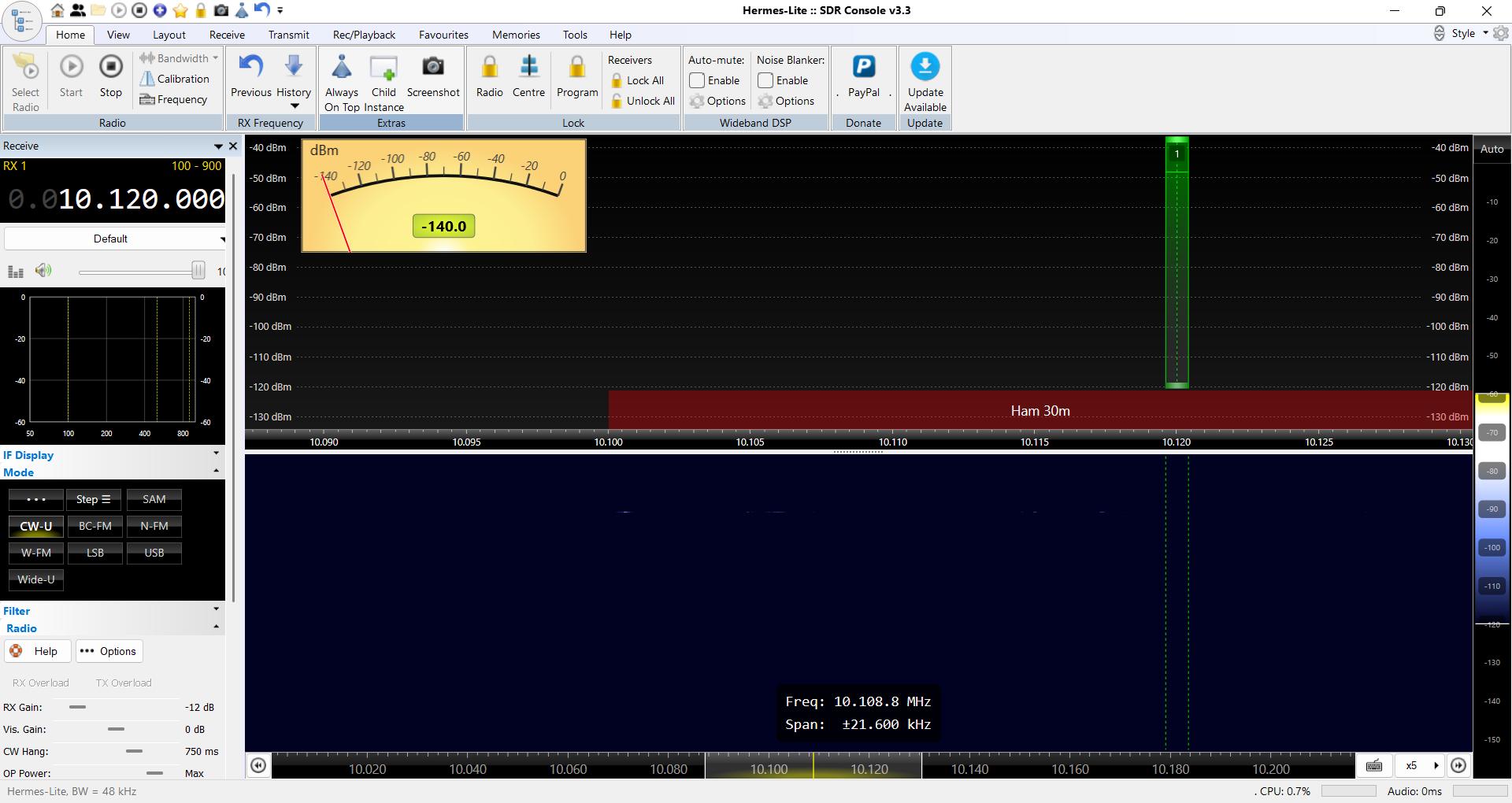
Any ideas?
Kind regards,
Dragan, 4O4A
I'd like to report the same problem on my side. New HL2, works fine with Tethis. It is correctly recognized by SDRC, but when I start radio, after less than one second on RX it switches to TX. Output is real, measured on my external W-meter. It happens both in CW and SSB modes. If I quickly to to settings of radio and disable its PA, RF stops, but radio is still PTT-ed. If I leave PA off and restart radio, it is PTT-ed and there is no RX (but this short period of time right after start).
I had the most recent v3.4 beta version, but it happens also on v3.3.
Here is the screenshot:
Any ideas?
Kind regards,
Dragan, 4O4A